
2026-09-27T00:00:00.000Z · MUI Gamebook
Building Interactive Gamebooks with Multimodal AI Agents: A Complete Workflow from Skills to Artwork & Publishing
Discover how to harness multimodal AI Agents (Google Antigravity, Codex, Xiaomi Mimo, WorkBuddy) to automate the entire interactive gamebook lifecycle: from skill setup and branching storytelling to embedded minigames, compiler-level dead-end detection, image generation, and one-click publishing.
Have you ever had a brilliant concept for a gripping suspense thriller, an intricate tabletop RPG module, or a branching story filled with consequential dilemmas—only to abandon it when confronted with steep game engine learning curves, cryptic scripting languages, and prohibitive art and music budgets?
The high barrier to entry in traditional visual novels (VNs) and adventure games (AVGs) has long hindered talented writers and narrative designers. Even with specialized game engines, hand-crafting flowchart branches, handling scene transitions, and tracking state variables remains an exhausting chore.
With the advent of multimodal foundation models and autonomous AI Agents, this landscape has changed completely. MUI Gamebook (muistory.com) breaks down the entire game development pipeline into standardized Skills that any modern AI Agent can orchestrate. Writers can now direct narrative arcs using natural language, have the Agent generate playable embedded HTML5 puzzle minigames on the fly, run compiler-grade dead-end topological analysis, and produce cohesive artwork and visual assets—all within a single unified workflow.
This guide outlines a battle-tested, 10-step industrial pipeline that takes your concept from initial prompt to a polished, published interactive gamebook.
💡 Why You Must Choose a Multimodal AI Agent
Before diving into the steps, an essential prerequisite must be clarified:
Interactive fiction is not purely a code development task; it is a rich audiovisual storytelling medium that weaves together narrative prose, state-driven logic branches, character portraits, background art, and sound.
Consequently, code-only AI tools that lack native image generation and visual rendering pipelines are ill-suited for creative game development. We strongly recommend using modern, multimodal AI Agent environments:
- Google Antigravity: Google's premier autonomous agent environment, equipped with deep task planning and native image generation toolchains;
- Codex: Highly mature ecosystem with expansive context memory, ideal for massive, web-like story branches;
- Xiaomi Mimo (Mimocode): Strong native multimodal creation capabilities and a rich plugin ecosystem;
- WorkBuddy: Tencent's professional agent workbench, offering first-class support for creators across media generation.
Selecting a multimodal Agent ensures that once your story logic is locked in, the Agent can seamlessly invoke drawing tools to illustrate scenes and push assets to the cloud without switching tools.
💡 The Core Question: Why Create on MUI Story Instead of Directing AI to Write Ren'Py?
Experienced visual novel developers frequently ask: Since modern LLMs are so capable, why not just ask an AI to write a Ren'Py Python script directly, rather than building on MUI Story (muistory.com)?
The answer lies in authoring agility, hallucination resistance, and viral distribution efficiency. MUI Story is not designed to replace Ren'Py, but to serve as its modern, agile production frontend:
Zero-Setup, Pure Browser-Driven Creation & Play: Ren'Py requires downloading multi-gigabyte SDKs, configuring Python runtimes, and dealing with specialized IDEs. Building for mobile requires installing Java JDKs, Android SDKs, and certificate signing keys. In contrast, MUI Story runs entirely in any modern browser with zero installation. Whether you are on Windows, macOS, an iPad, or a smartphone, you can write, preview, and test anywhere—even polishing dialogue during your daily commute.
Instant Web Previews & One-Click Friend Playtesting: In traditional engines, sharing an early build requires packaging a multi-hundred-megabyte archive (.exe or .apk). Playtesters often drop out due to extraction hassles, OS security warnings, or mobile installation friction. With MUI Story, you generate a shareable web link that friends can play instantly in their mobile or desktop browser, accelerating playtest feedback a hundredfold.
Seamless Export to Ren'Py for Steam Commercialization: Creating on MUI Story does not lock you into the web. The underlying DSL is a structured, standardized asset format. Once you validate your narrative pacing, branching topology, and state balance, you can compile and export the project into standard Ren'Py scripts and desktop binaries for Steam publishing.
Natural High-Converting Web Demos: Even if your final destination is a commercial release on Steam, a browser-based demo is your highest-converting acquisition funnel. Instead of requiring players to download a massive standalone demo, you can share a browser link across social media (Reddit, Discord, X, Bilibili). Players experience the first three chapters instantly, with a direct call-to-action to wishlist the game on Steam upon reaching the cliffhanger.
Lightweight Markdown DSL Eliminates Fragile Python Indentation: Having an AI write raw Ren'Py code means managing complex Python syntax. As branches multiply, LLMs frequently hallucinate label names, call stacks, screen layouts, and indentation levels—where a single whitespace error breaks the entire build. MUI Story's intuitive Markdown syntax aligns naturally with LLM pretraining, drastically reducing token consumption and syntax errors.
Deterministic Compiler-Grade "Dead-End Verification": Ren'Py lacks static full-graph reachability analysis. If you misspell a target scene label or define an unreachable variable condition, Ren'Py will not complain during build time; players only discover the crash when their playthrough abruptly crashes on that exact choice. MUI Story features a built-in static analysis engine (
validate-game) that traverses all paths, ensuring 100% logic integrity before release.Embedded Plug-and-Play HTML5 Minigames: Implementing mini-puzzles (such as lockpicking, keypad hacking, or QTEs) in Ren'Py requires cumbersome UI layouts and low-level Pygame scripting, which often perform poorly on mobile touchscreens. On MUI Story's modern web architecture, AI agents can generate lightweight, responsive HTML5 puzzle widgets that run smoothly on touch and keyboard alike, feeding victory or defeat states directly back into narrative variables.
Out-of-the-Box Player Ratings & Community Feedback: Standalone game binaries are black boxes where creators rarely know player completion sentiments. MUI Story includes an integrated end-screen 5-star rating widget, reflective long-form reviews, offline-first local caching, and author pin boards. You start cultivating your dedicated player community from day one.
graph TD
    A[Step 1: Feed Skills URL to Agent] --> B[Step 2: Restart Agent to Load Skills]
    B --> C[Step 3: Configure MCP to Connect Platform]
    C --> D[Step 4: Restart Agent to Activate Remote Tools]
    D --> E[Step 5: Natural Language Narrative & Branching]
    E --> F[Step 6: Local & Online Playtest Verification]
    F --> G[Step 7: Embed Interactive HTML5 Minigames]
    G --> H[Step 8: Full Topological Dead-End Analysis]
    H --> I[Step 9: Generate Artwork via Agent & Upload Assets]
    I --> J[Step 10: One-Click Publishing & Community Reviews]
    J -.-> K[Future Pipeline: Compile to Ren'Py & Steam Release]
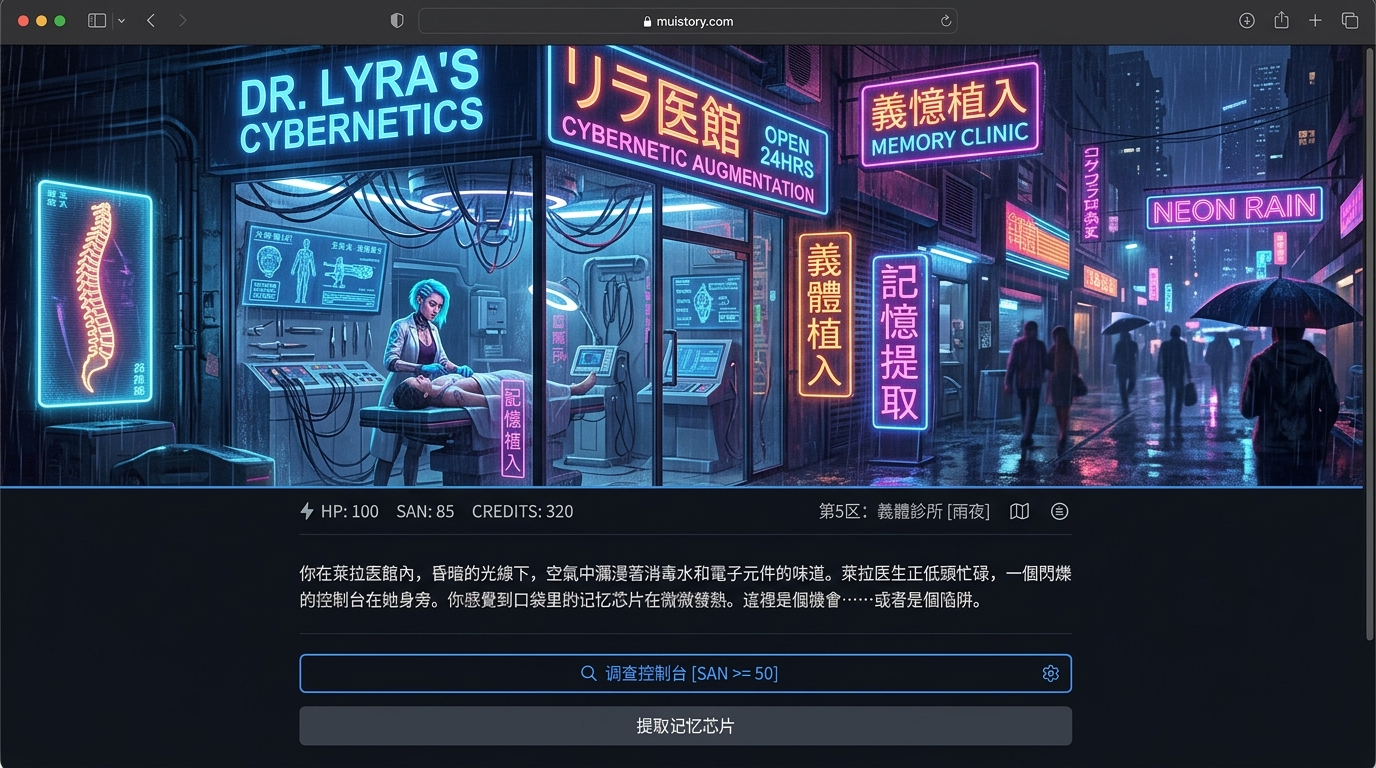 Figure 1: MUI Gamebook browser player experience—zero installation, rich artwork, real-time inventory, and status monitoring.
Step 1: Feed the Skills URL to Your AI Agent for Auto-Installation
Forget copying endless terminal commands or searching GitHub releases. In MUI Gamebook, installation is as simple as pointing your Agent to the documentation.
Navigate to MUI Gamebook Skills Center, copy the link, and send it to your multimodal Agent:
Please read https://muistory.com/skills to understand the MUI Gamebook
creator skill specifications, and download/install all corresponding skill
packages into my current workspace at .agents/skills/.
The Agent will inspect the documentation, retrieve the specifications for setup (setup), script authoring (create-game), minigames (create-minigame), game upgrading (upgrade-game), and logic verification (validate-game), and organize them cleanly in your local workspace.
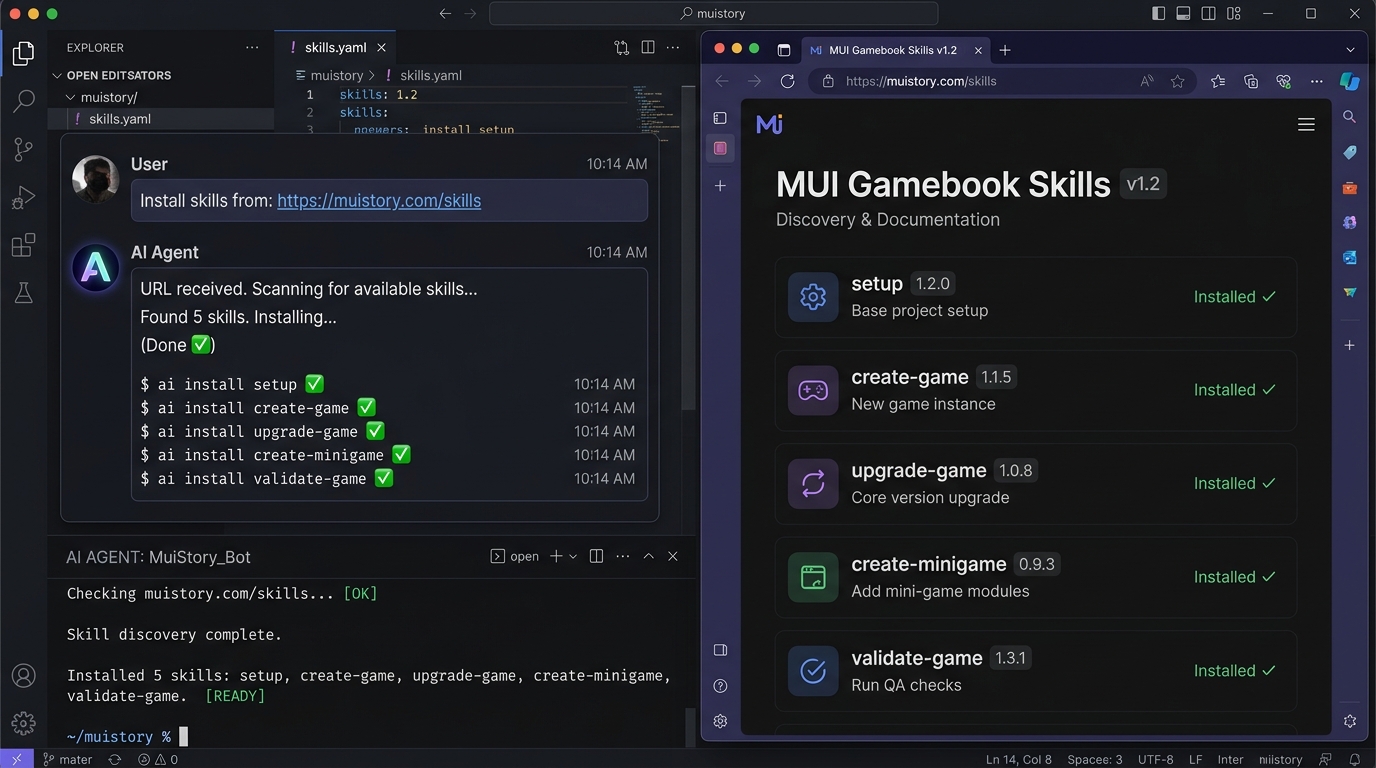 Figure 2: Simply provide the skills URL to let the Agent automatically download the 5 standardized skill packages.
Step 2: Restart the AI Agent or Open a New Chat
Skills serve as system-level directives and specialized workflows for the Agent.
Once the skill files are placed locally, the client must rebuild its tool context. Restart your AI Agent client or close the window and open a fresh conversation.
Verify that the skills are active:
List all loaded mui-gamebook skill packages in the current workspace.
When the Agent lists all 5 packages and their roles, its creative brain upgrade is complete.
Step 3: Configure MCP to Connect to MUI Story Cloud
Having local skill prompts is not enough; the Agent needs real-time read and write access to your project assets and cloud database. This is handled by the Model Context Protocol (MCP).
Trigger the setup skill in your chat:
Please use the mui-gamebook-setup skill to help me configure the connection
to muistory.com.
The Agent will guide you through:
- Generating a personal API Key from your muistory.com dashboard;
- Creating or updating the local
mcp_config.jsonfile; - Running a connectivity probe to verify authentication and endpoint health.
You don't need to manually touch any JSON formatting—the Agent handles environment wiring end-to-end.
Step 4: Restart Agent Once More to Activate Remote MCP Tools
After writing the MCP configuration, most Agent clients (Google Antigravity, Codex, WorkBuddy) need to re-initialize their tool registry.
Restart the client or launch a new chat window. In the Agent's tool inventory, you will now see dedicated remote tools for script editing, asset queries, and cloud preflight checks. Your AI Agent is now fully connected to the cloud game engine.
Step 5: Author Branching Narrative Using Natural Language
Now you can bring your story ideas to life. You don't need coding experience or arcane syntax; simply describe your narrative vision as you would to a senior narrative designer:
Please invoke the create-game skill. I want to build a cyberpunk
interactive detective thriller titled "Neon Shadows".
The protagonist discovers a tamper-locked cybernetic memory core in a
back-alley clinic. Please establish the world setting, initialize sanity
(san) and street reputation (reputation) variables, and design at least
three distinct narrative endings.
The create-game skill follows an orderly narrative engineering workflow:
- World & Core Conflict: Establishes the setting, stakes, and faction dynamics;
- Protagonist & State Variables: Defines attributes, currencies, and threshold rules;
- Branch Convergence & Endings: Plans good, bad, and true hidden endings;
- Standard Markdown DSL Generation: Assembles scenes with headers, prose, conditional flags (
if), and jump arrows.
# clinic_operating_table

Cold acid rain taps against the reinforced glass. The flickering blue neon
sign reflects in murky puddles outside. On the operating table lies a
water-logged android, its chest ventilation grille emitting a faint, dying
hum.

> status: san = 80, has_decoder = false

* Use portable decoder to bypass memory core [if: has_decoder == true] ->
[scene:hack_memory]
* Search the android's heavy trench coat -> [scene:search_coat]
* Draw sidearm and call Sector 9 Police Dispatch -> [scene:call_police]
You can ask the Agent to refine dialogue voice, adjust tonal pacing, or expand alternative investigation avenues anytime.
Step 6: Test Play Locally and Online
Once the first draft is ready, do not publish blindly. Experience the narrative pacing and player choice agency firsthand.
MUI Gamebook provides two preview workflows:
- Local Live Preview: Run a lightweight local dev server to preview scenes with instant hot-reloading as you edit Markdown files;
- Private Cloud Playtest: Save the story as a cloud draft via MCP and open the private link on muistory.com to play through choices on your phone or desktop.
During testing, check: Does every choice deliver satisfying feedback? Are resource gains and penalties fair? Do branching paths spark curiosity for a second playthrough?
Step 7: Embed Interactive Puzzle Minigames at Climax Scenes
This step sets interactive gamebooks apart from standard linear text adventures!
When a narrative moment involves "cracking a safe," "defusing a timed charge," or "stealth lockpicking," pure text can fall flat. Call upon the create-minigame skill:
When the protagonist attempts to breach the terminal (hack_memory scene),
please use the create-minigame skill to generate a retro terminal password
decryption minigame.
Give the player 30 seconds to deduce a 4-digit code from hexadecimal hints.
Success sets hack_success = true and leads to the decryption victory
branch; failure sets alert_triggered = true and inflicts a 30-point health
penalty.
The Agent will produce a self-contained HTML5 interactive component:
- Zero external black-box dependencies, running safely in the browser sandbox;
- Optimized for mobile touch gestures and desktop keyboard controls;
- Bidirectional Variable Binding: The minigame's outcome directly steers subsequent narrative branches.
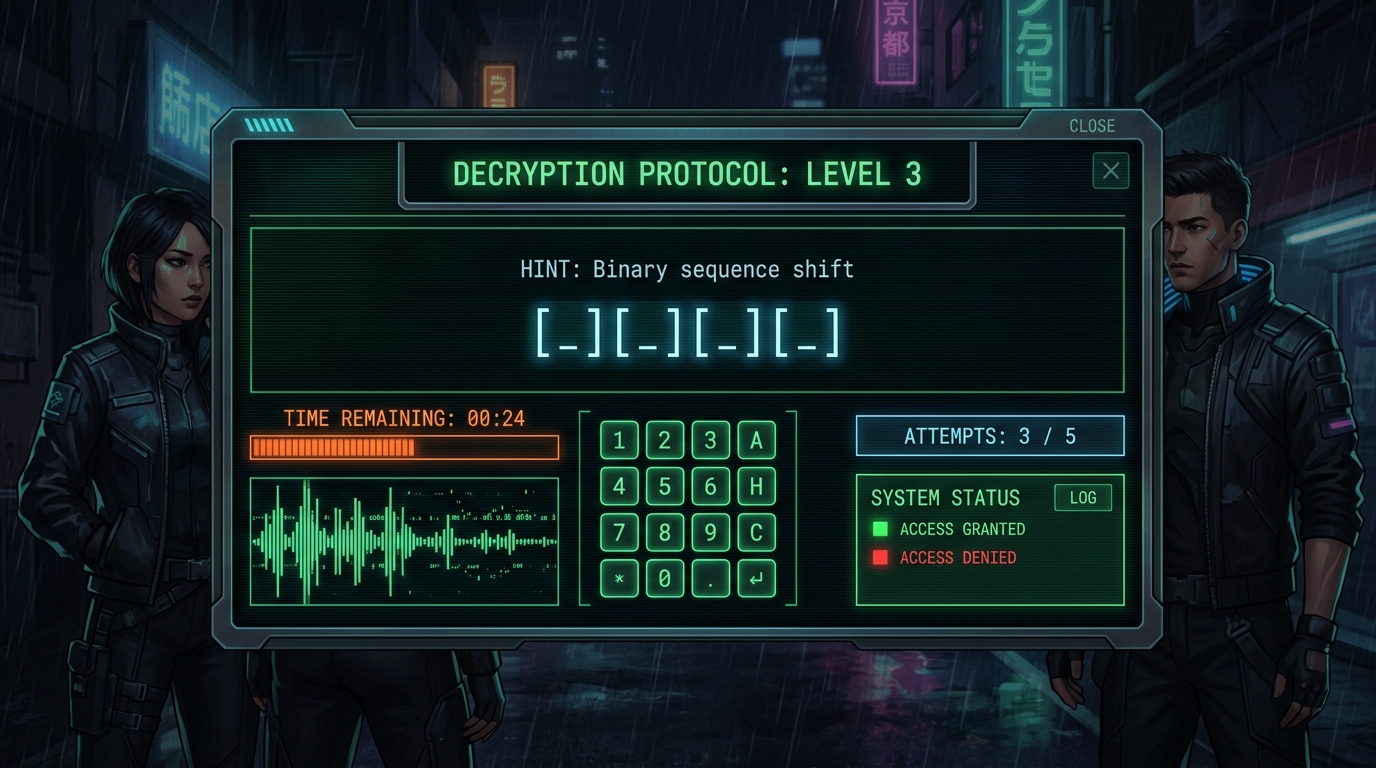 Figure 3: Embed responsive HTML5 puzzle minigames at critical story beats to let player skill drive the plot.
Step 8: Run Compiler-Grade Dead-End Topological Checks
Anyone who has written complex branching narratives knows the nightmare of broken links: an orphaned scene with no exit, a secret ending requiring 100 reputation when only 70 can possibly be earned, or a typo in a scene ID that causes a crash.
Before finalizing your script, invoke validate-game:
Please run a complete validate-game topological check on the current
interactive script, identifying any dead ends, unreachable scenes,
undefined variables, and infinite loops.
The Agent executes a compiler-like graph scan:
- Orphan Node Detection: Finds scenes that exist in the text but cannot be reached by any preceding player choices;
- Dangling Target Detection: Identifies misspelled target scene identifiers;
- Softlock Path Tracing: Detects whether players can enter branches with no possible route to an ending;
- Variable Consistency: Confirms that all conditional
ifchecks rely on initialized and attainable variables.
The Agent outputs a detailed diagnostic report and can automatically fix logic gaps with your approval.
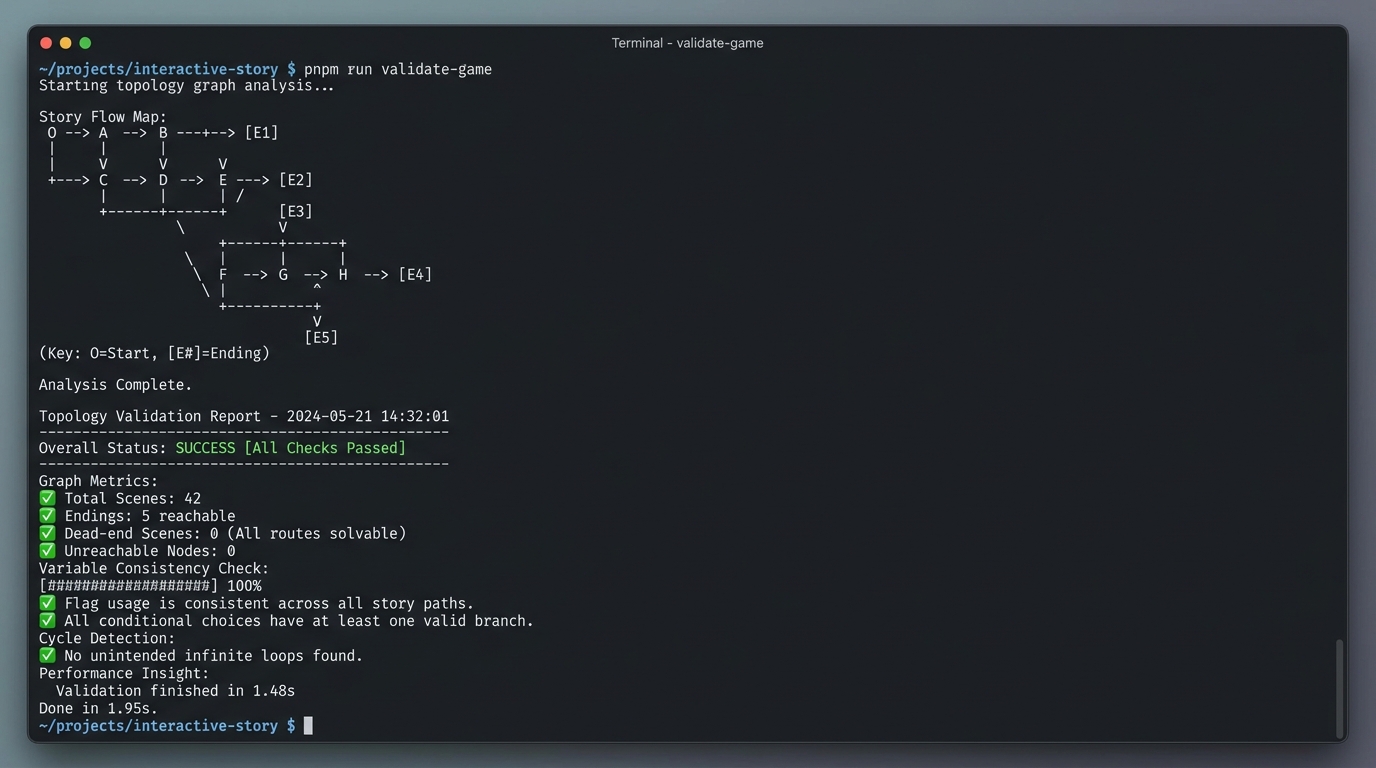 Figure 4: validate-game scans the full narrative graph in milliseconds, guaranteeing zero dead ends and 100% reachability.
Step 9: Generate and Bind Visual Assets After Logic is Locked
⚠️ The Golden Rule for 90-Point Creators: Never generate images before finalizing the story!
Many creators rush to generate dozens of illustrations on day one, only to discard half of them when story beats change—wasting time, compute credits, and creative momentum.
Lock in your narrative topology in Step 8 first. Once the structure is stable, begin visual packaging.
Because you are using a multimodal Agent (Google Antigravity, Codex, Mimo, or WorkBuddy), you can command it to generate and bind assets in bulk:
The story logic is validated. Please extract visual descriptions from all
scenes, use your built-in image generation capability to generate cohesive
cyberpunk pixel-art backgrounds for key scenes, upload them via the
mui-gamebook MCP tool, and backfill the image URLs into the Markdown
script.
The Agent generates consistent, styled illustrations and automatically updates media references in your Markdown file. Your script instantly transforms from plain text into an atmospheric visual story.
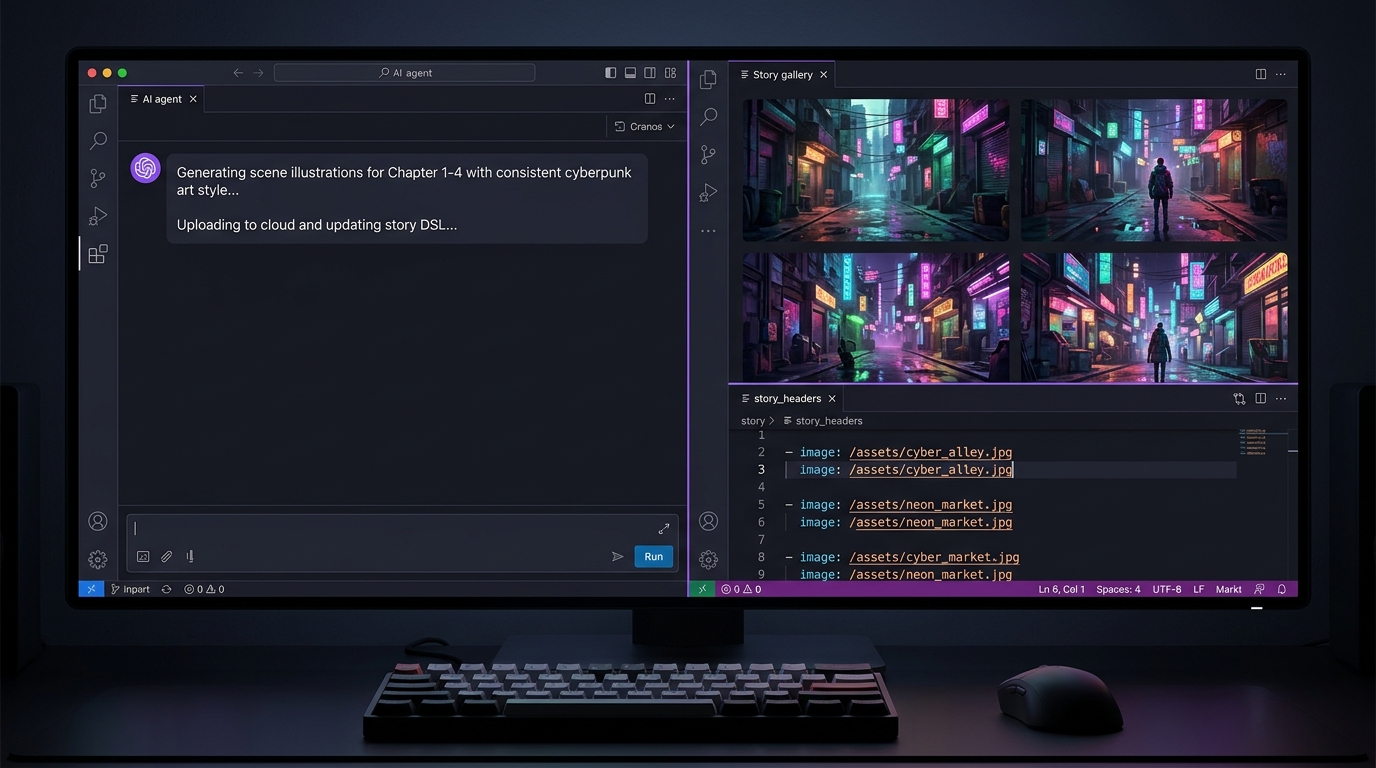 Figure 5: Once logic is locked, the multimodal Agent generates cohesive artwork and binds links directly into the script.
Step 10: Publish in One Click and Build Your Reader Community
With everything polished, instruct your Agent to publish:
Please sync and publish the current gamebook to muistory.com.
Within seconds, you receive a production-ready, responsive web URL:
- Zero Download Friction: Playable immediately on iOS, Android, macOS, and Windows browsers;
- RatingWidget: Upon reaching an ending, players can award 1 to 5 stars and submit detailed reviews. Unauthenticated reviews are cached locally and synced seamlessly upon sign-in;
- Creator Dashboard: Track score trends, browse player feedback, and pin top community reviews directly to your game's landing page;
- Social OpenGraph Cards: Dynamic preview cards ready for sharing on social platforms.
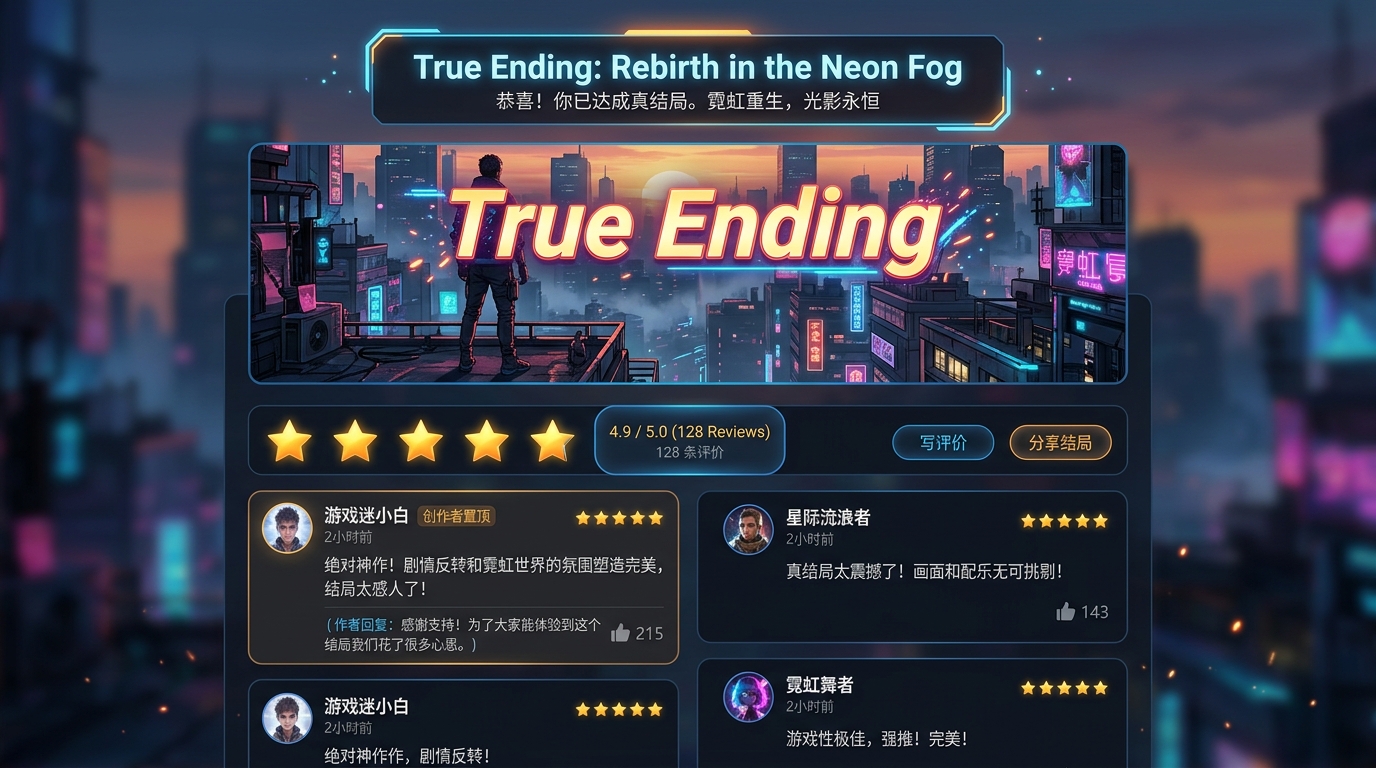 Figure 6: Readers submit ratings and long-form reviews upon completion, which authors can pin on their game homepage.
Conclusion: Turn Great Stories into Playable Games
Transforming an idea from your notepad into an interactive, illustrated gamebook featuring custom puzzle minigames, verified branching logic, and community reviews no longer demands months of programming or large production teams.
Equip your favorite multimodal AI Agent, import the skills at muistory.com/skills, and let your stories come alive with every choice!
Keep your material organized
An article can point the way, but before you apply you still need your own experience, projects, and target role. The Mui app keeps that material in one local library.
Download the desktop app